Your limit.
Locked in.
Cato Guard watches your trading accounts in real time and locks trading the second you hit your daily loss. You cannot undo a lock. Trading resumes at your next session.
For prop firm accounts and personal accounts.
Futures Available CFDs Available
Futures and CFDs: create your account and arm the Guard today.
Futures prop firms on Tradovate, and personal accounts too.
- Apex Trader Funding
- Take Profit Trader
- My Funded Futures
- Tradeify
- Lucid Trading
- BluSky
- Funded Futures Network
- Alpha Futures
Connects to


 5
and more coming
5
and more coming
Everything on this page runs today on Futures with Tradovate and on CFDs with MetaTrader 5, on the same rules.

Accounts don't blow up on the first loss.
They blow up on the trade after it. You hit the daily limit, tell yourself one more, and the account you worked for, an evaluation or your own money, is gone before lunch.
Cato Guard takes that trade off the table. The moment the limit is hit, the account is flattened and locked, and it stays locked until your next session, whatever you feel like at 15:40.
See the Guard at work.
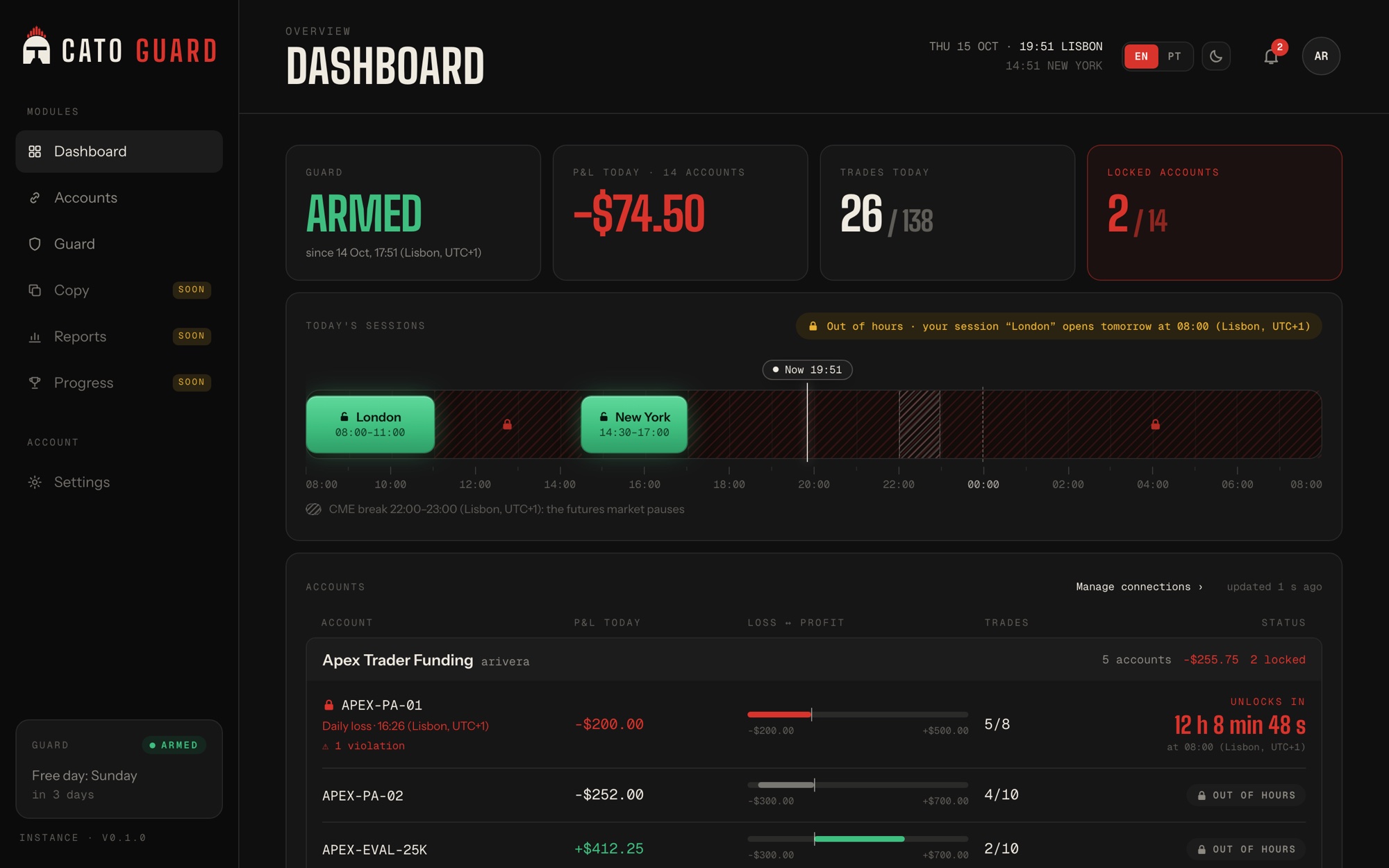
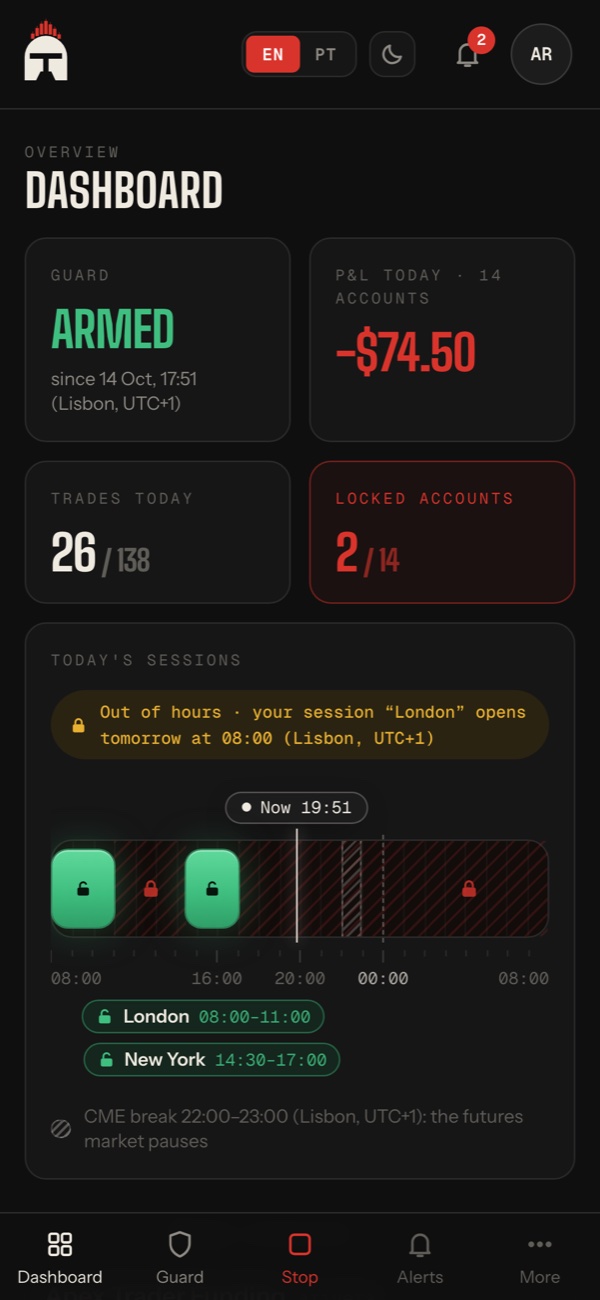
One screen tells you where every account stands, in your own time zone, in English or Portuguese.
Futures · demo data
P&L, trades and locks for every account, grouped by login. The timeline shows your sessions, the CME break and the moment you are.
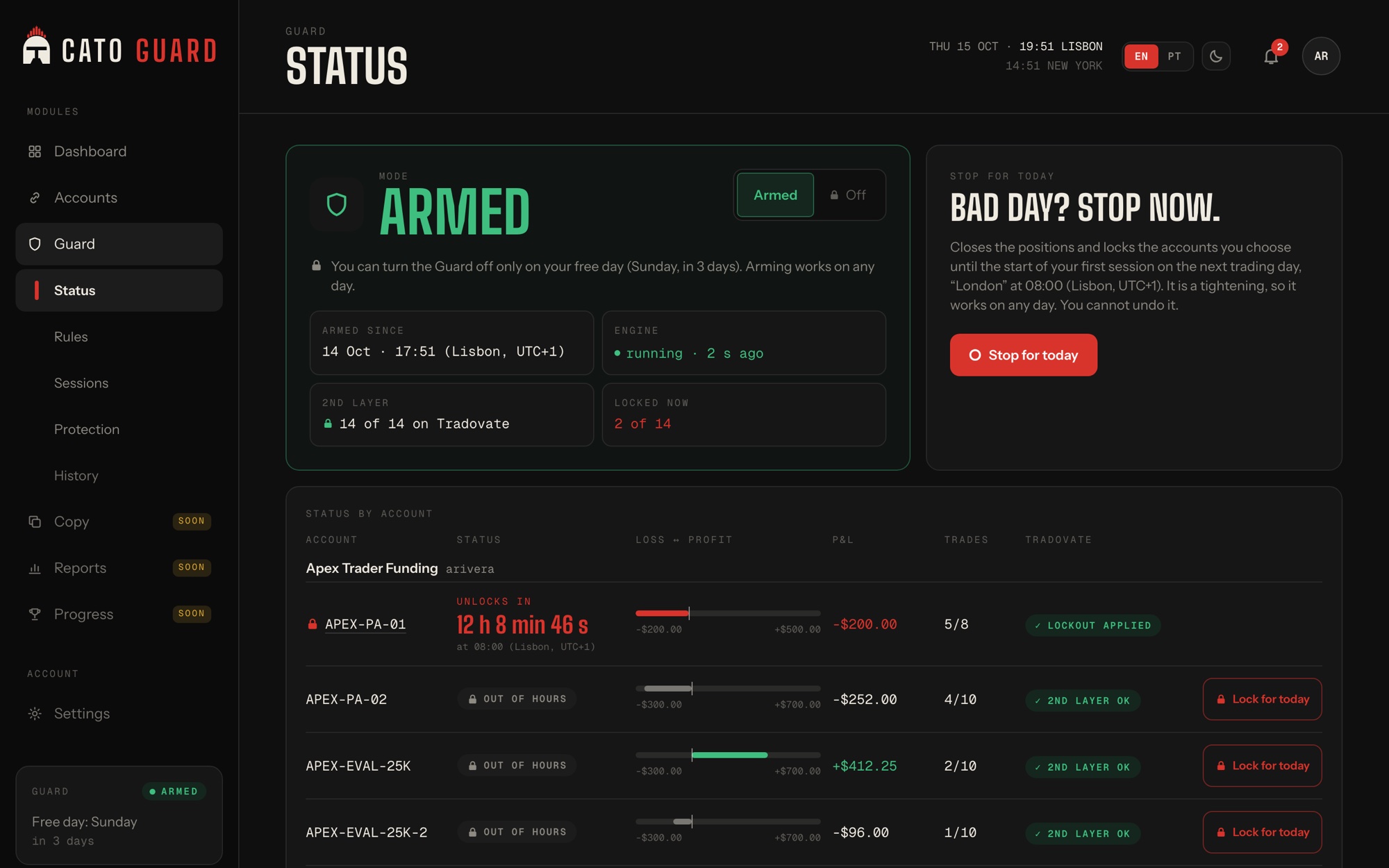
Armed since, engine heartbeat, the second lock on every account, and one red button for a bad day: stop now, locked until your next session.
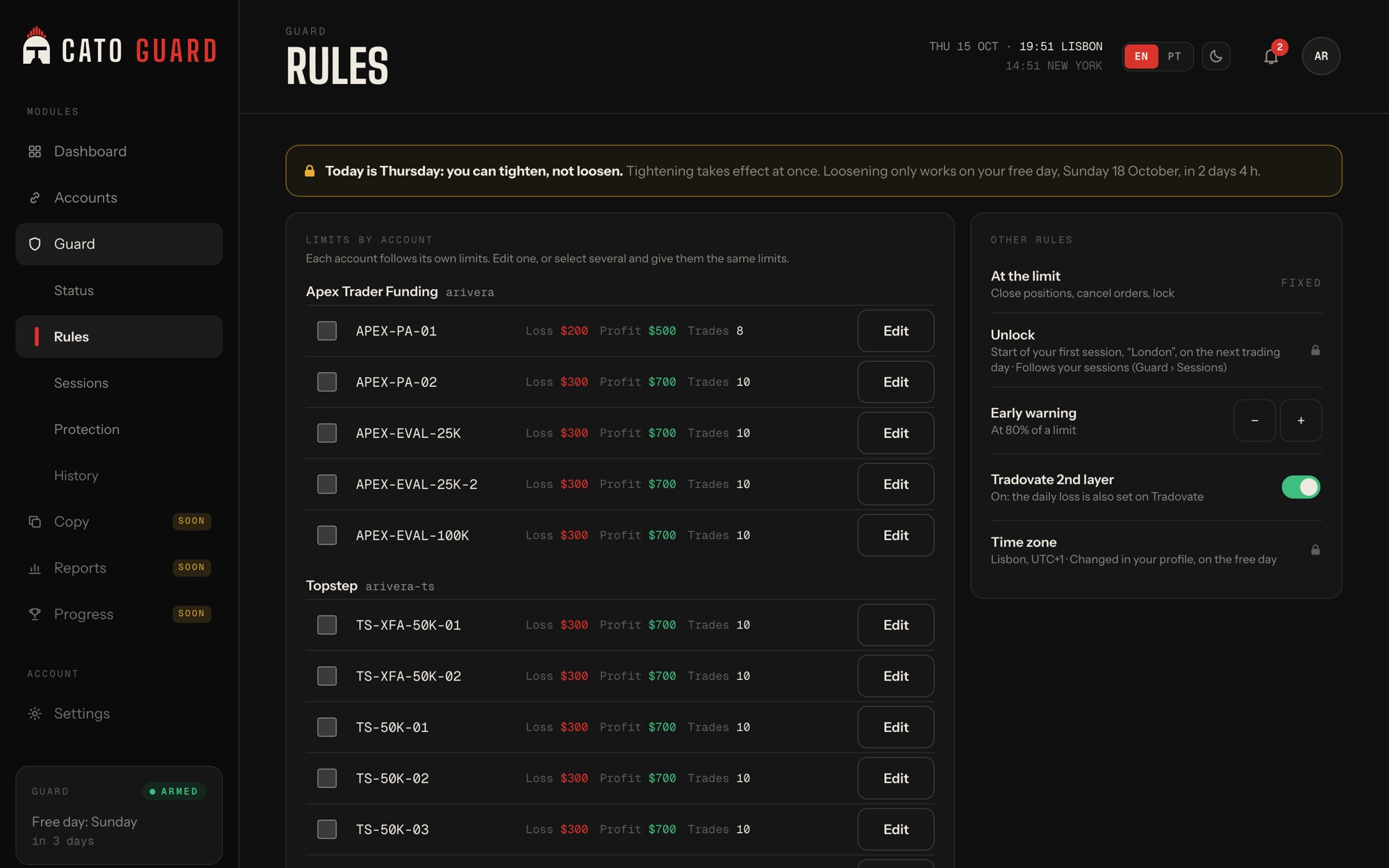
Daily loss, profit target and trade count. Defaults per firm, overrides per account, and a reset back to default when you change your mind.
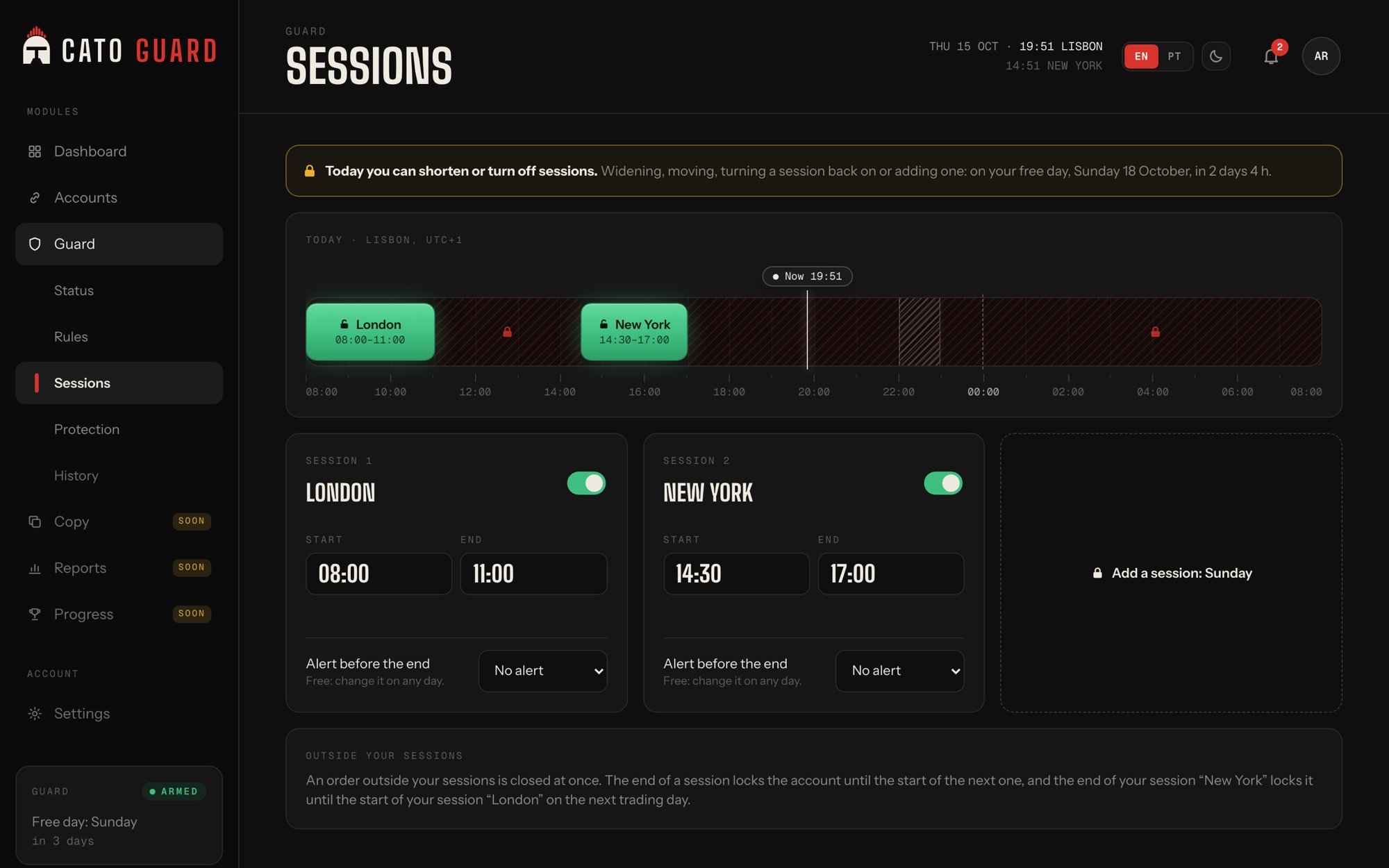
Up to three sessions a day. Outside them the account is locked. One free day a week, in your time zone, is the only day you can loosen anything.
Ten minutes to set up. Then it never asks again.
-
Connect your broker login
Tradovate for Futures, MetaTrader 5 for CFDs. Your accounts come with it, prop firm or personal. Credentials are encrypted for your own Guard machine; we never keep them in plain text.
-
Set your rules
Daily loss, profit target, trade count, up to three sessions and one free day a week. Sensible defaults per prop firm, your own numbers on a personal account, overrides per account.
-
Arm the Guard
From then on it runs on its own server, 24 hours a day, with or without your laptop. A lock opens at your next session and not before.
A rule you can't argue with at 15:40.
Most risk tools are settings. A setting can be changed by the same person who is about to revenge-trade. Cato Guard is a guard: you set the rule in the morning, and the Guard holds it for you, on a machine you cannot talk out of it.
What the Guard enforces.
Limits count the whole trading day across sessions. Every time is shown in your profile's time zone.
Futures (Tradovate) and CFDs (MetaTrader 5) share these rules: daily loss and profit target, trade limit, sessions, one free day and a lock you cannot undo. On CFDs a limit can be an amount or a % of the balance at the start of the day, in the account's currency, and each account's day starts with its broker's daily candle.
- Daily loss limit
- Flatten and lock at the number you set the night before, not the one you negotiate at noon.
- Daily profit target
- Lock in a green day before you give it back.
- Trade count
- A cap on trades per day, so a bad hour cannot become a bad day.
- Trading sessions
- Up to three a day, for example London 08:00 to 11:00 and New York 14:30 to 17:00, Lisbon time. Outside them, locked.
- One free day a week
- Saturday or Sunday, 00:00 to 23:59 in your time zone. The only day you can relax a rule or switch the Guard off.
- Per-account overrides
- Same login, different account sizes, different limits. Reset to the default in one tap.

Two locks. One rule: you cannot undo it.
Futures: the Tradovate lockout
On Tradovate accounts, the moment a limit is hit, Cato Guard flattens the account and applies Tradovate's own Account Lockout.
The Guard's own lock
An independent lock, kept on the Guard server, that survives restarts. Any order that opens after a breach is closed at once and recorded as a violation, with its real cost, in your history.
CFDs: MetaTrader 5
At your limit the Guard closes positions and removes pending orders; while locked, any position you open is closed at once. MetaTrader 5 brokers have no lock of their own, so on CFDs the lock is Cato's alone, with no second layer on the broker's side. You connect with the account number, the trading password (not the investor one) and the broker's server.
On its own server
Your Guard is a dedicated machine with no inbound ports. Close the laptop, lose the Wi-Fi, reboot the PC. The lock holds, and it opens at your next session.
How to start.
One Cato Trade account covers every Cato product. Start with Cato Guard in three steps.
- Create your Cato Trade account. One account for every Cato product.
- Choose Cato Guard and your plan in your account.
- Connect Tradovate or MetaTrader 5 and arm the Guard.
Cato Guard
Futures and CFDs are open: create your account, choose your plan and start today.
One plan. As many accounts as you want.
No tiers and no feature gates. One plan covers every account you have, with the whole Guard on each. Pay monthly, or yearly with .
Launch price. Create your account and start today.
Cato Guard
/month one plan for all your accounts, VAT included
- Daily loss, profit target and trade-count limits
- Up to three sessions a day and one free day a week
- Two-level lock with violation history
- Your own dedicated Guard server, no inbound ports
- Unlimited accounts
- Per-account overrides, prop firm or personal accounts
- Alerts in the app and by email, in English and Portuguese
- Futures on Tradovate and CFDs on MetaTrader 5
Cancel any time. Cato Copy, our copy trader, uses the same Cato Trade account.
Connects to
5
and more coming
Questions traders ask first.
Can I use Cato Guard today?
Yes. Create your account, choose Futures (Tradovate) or CFDs (MetaTrader 5), connect your login and arm the Guard.
Can I unlock an account myself?
No. You cannot undo a lock. A locked account opens at the start of your next session, or at the first session of the next trading day after a breach. On Friday that means Monday morning.
Which markets, brokers and prop firms does it work with?
Futures: Tradovate today, which covers the prop firms whose accounts live there; Rithmic and other connectors will follow. CFDs: MetaTrader 5, for prop firms and brokers that give you an MT5 account. The Guard reads your accounts from the login you connect, you never type them in.
Does it work on a personal account, not a prop firm?
Yes. The Guard protects any account on a supported connector: prop firm evaluations and funded accounts, and personal broker accounts. On a personal account you set your own limits instead of a firm's defaults.
What happens if my internet or my PC goes down?
Nothing changes. The Guard runs on its own server, not on your machine. If that server ever loses contact with us, it keeps enforcing the rules it already has. Losing a connection never disarms the Guard.
Do you store my broker password?
Your browser sends it once, encrypted with your own Guard server's key. The server stores it encrypted; our central systems never keep it in plain text.
What is the free day?
One day a week, Saturday or Sunday, from 00:00 to 23:59 in your profile's time zone. It is the only day you can relax a rule or switch the Guard off, per account or entirely. The Guard does not re-arm itself afterwards; you do.
What is a violation?
On Futures today: an order that opens after a breach. The Guard closes it immediately and records it in your history with its real cost, the open and close commissions. You see it on the dashboard and on the lock screen.
Which time zone are the times in?
Yours. Every time in the app carries your profile's zone, for example 08:00 (Lisbon, UTC+1), so a session set at home means the same thing when you travel.
How much does it cost?
a month for all your accounts, or a year, which is . VAT is included. That is the launch price.